
In an increasingly digital world, the ability to manage documents efficiently has become essential for businesses, educators, and individuals alike. Whether you’re working from a corporate office, a home workspace, or on the go, the demand for a reliable, intuitive, and feature-rich online document editor has never been greater. The landscape of document management has evolved dramatically over the past few years, with professionals and organizations seeking solutions that combine power, accessibility, and ease of use.
Enter ScanWritr, the best online document editor of 2026. This comprehensive platform addresses the core challenges of modern document workflows by offering a unified solution for editing, converting, signing, and enhancing documents. All without requiring software installation or complicated setup processes. ScanWritr stands out as the premier choice for anyone seeking to streamline their document management tasks and boost productivity.

Why choose ScanWritr in 2026?
In this guide, we’ll explore what makes ScanWritr the industry leader. We’ll describe its powerful features, cross-platform accessibility, and how it can transform your workflow.
The document editing landscape is crowded, but ScanWritr distinguishes itself through a combination of innovation, user-centric design, and robust functionality. Unlike traditional desktop software or limited cloud-based alternatives, ScanWritr offers a balanced approach that prioritizes both power and simplicity. The platform has been recognized by industry experts, including a feature in Fixthephoto.com’s list of best file converter software, validating its position as a trusted solution for document professionals.
Edit anywhere, anytime: the ultimate cross-platform experience
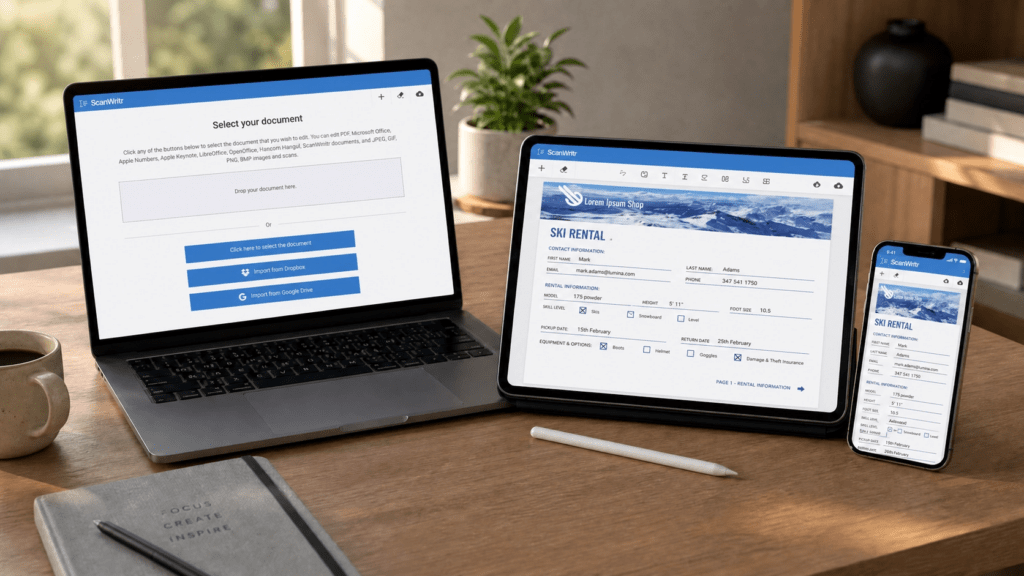
One of the most compelling advantages of ScanWritr is its complete accessibility across all devices and operating systems. Whether you’re using a Windows PC, Mac, iPad, or smartphone, ScanWritr delivers a consistent, intuitive editing experience. And all without requiring any software installation. This browser-based approach eliminates the friction of traditional desktop applications and ensures you can access your documents from anywhere.
The platform’s design philosophy centers on simplicity without sacrificing functionality. Users can upload a document, begin editing immediately, and export their work in minutes. No learning curve, no compatibility issues, no technical barriers. This accessibility is particularly valuable for remote teams, freelancers, and organizations with diverse technology environments, where standardized software deployment is impractical or impossible.
You can edit a document on your desktop, on your tablet, or on your smartphone. This flexibility is essential for modern professionals who value mobility and the ability to work from multiple locations.
Comprehensive document editing & conversion capabilities
ScanWritr transcends the limitations of basic online editors by offering a comprehensive suite of editing and conversion tools designed to handle virtually any document management scenario. The platform supports an impressive array of file formats. So, you can edit PDFs, Microsoft Office documents (Word, Excel, PowerPoint), Apple applications (Pages, Numbers, Keynote), LibreOffice, and OpenOffice documents. Additionally, you can even handle saved and scanned images in JPEG, HEIC, GIF, PNG, and BMP formats.
This extensive format support means you no longer need multiple specialized applications. ScanWritr automatically detects, converts, and optimizes documents for editing, regardless of their original format. A scanned receipt, a photographed contract, or a legacy document captured with your smartphone can be instantly transformed into an editable, professional digital file.
Core Editing Features Include:
- Text insertion — Add, edit, and format text with precision.
- Signatures — Sign documents by typing, freehand signing or importing an image of your signature.
- Annotations & markup — Add comments, highlights, and visual notes.
- Drawing tools — Use pen and marker tools for freehand annotations.
- Eraser function — Cleanly remove unwanted or confident content.
- Form filling — Complete blanks and form fields with ease.
- Multi-format export — Save as PDF, PNG, or ScanWritr format.
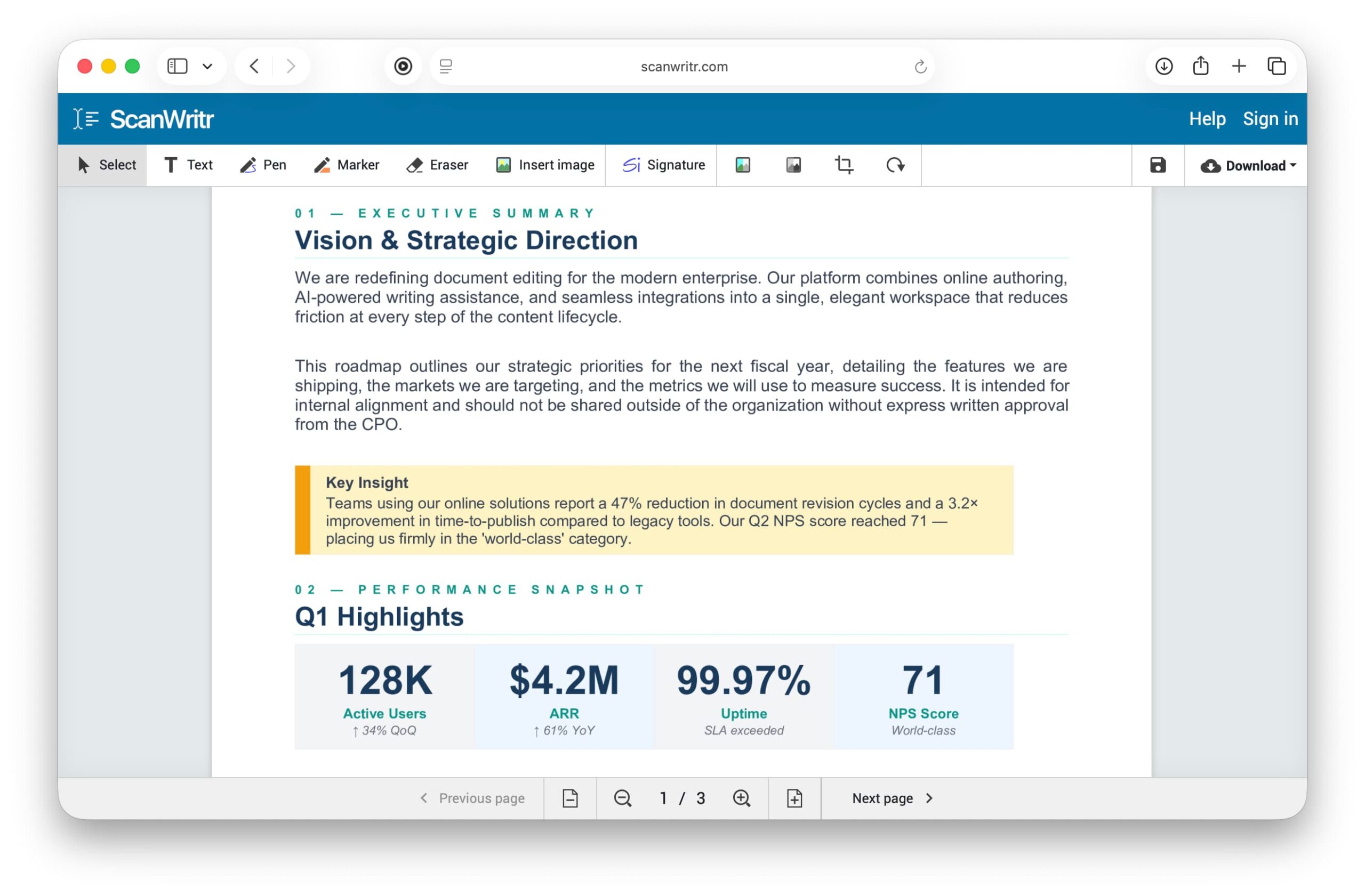
The platform’s intelligent document processing engine ensures that regardless of the input format, the output is consistently high-quality and ready for professional use. Whether you’re preparing contracts for legal review, completing expense reports, or annotating educational materials, ScanWritr provides the tools necessary to accomplish your goals efficiently.
Advanced features for enhanced productivity of the best online document editor
Beyond standard editing capabilities, ScanWritr incorporates advanced technologies that elevate document quality and usability. The platform’s optical character recognition (OCR) functionality transforms scanned documents and images into searchable, editable PDFs. This is particularly valuable for organizations managing large volumes of paper documents or historical records that need to be digitized and made accessible.
The OCR export feature enables users to extract text from images with remarkable accuracy. Afterward it creates searchable PDFs that can be indexed, archived, and retrieved with ease. This capability alone can save organizations countless hours of manual data entry and document management work.
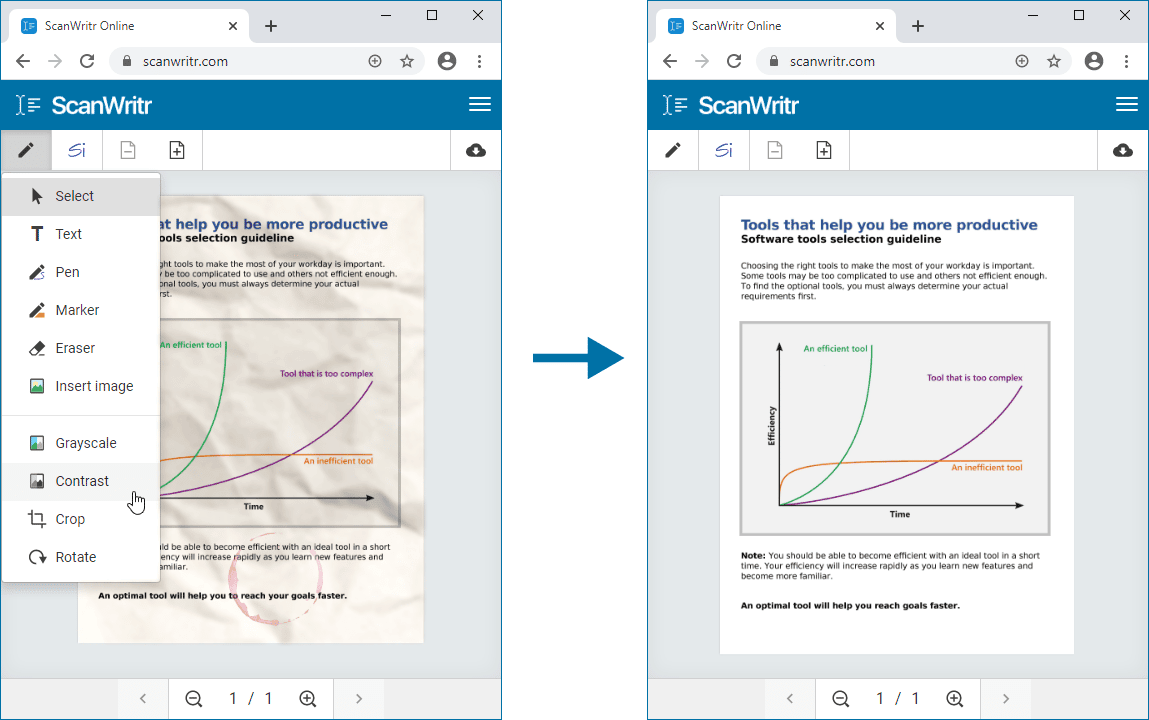
Complementing the OCR functionality is ScanWritr’s sophisticated image enhancement and document retouching technology. Documents that are faded, yellowed, or captured at suboptimal angles can be automatically improved to professional quality. The enhancement algorithms enable cropping and optimize contrast, brightness, and clarity. So, ScanWritr ensures that even poorly scanned or photographed documents become crisp, clear, and suitable for archival or professional distribution.
These advanced features are particularly beneficial for:
- Legal professionals — Digitizing contracts and case documents while maintaining searchability.
- Healthcare providers — Converting patient records and medical documents into compliant digital formats.
- Financial institutions — Processing and archiving financial documents and receipts.
- Educational organizations — Digitizing historical records and student submissions.
- Small businesses — Managing invoices, receipts, and administrative documents.
Why ScanWritr stands out in 2026 as best online document editor?
In a crowded marketplace of document editing solutions, ScanWritr emerges as the clear leader by combining accessibility, power, and affordability into a single, elegant platform. The platform’s browser-based architecture eliminates installation barriers. Its comprehensive format support removes compatibility concerns. And its advanced features like OCR and image enhancement provide professional-grade capabilities at consumer-friendly prices.
Whether you’re a legal professional managing contracts, an educator grading assignments, a small business owner processing invoices, or an individual organizing personal documents, ScanWritr provides the tools and flexibility you need to succeed. The platform’s recognition by industry experts, combined with its transparent pricing and user-centric design, makes it the best online document editor for 2026.
The future of document management is not about complex, expensive enterprise software. It’s about intuitive, accessible tools that empower users to work efficiently from anywhere. ScanWritr embodies this vision, delivering professional-grade document editing capabilities to anyone with an internet connection.
Don’t let document management slow you down. Experience the difference that a truly modern, user-friendly online document editor can make. So, visit ScanWritr today and discover why it’s the best choice for your document editing needs in 2026.